


Warships Mobile 2: Naval War
4.81.67K Reviews
App Specs
- Version
- 0.15.3
- Updated On
- License
- Free
- Downloads
- 5,000,000+
- Developer
- Armada Forge Games
- Categories
- Action
- Platform
- Android
Screenshots
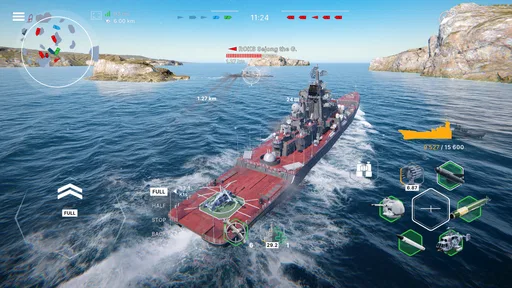
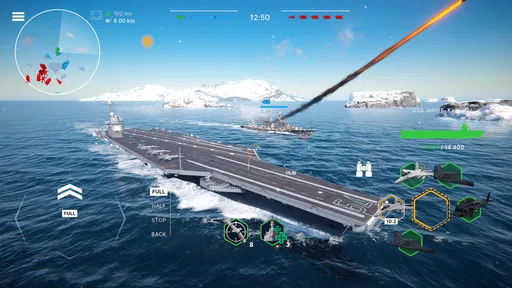
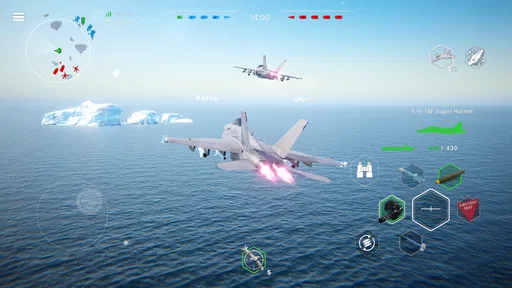
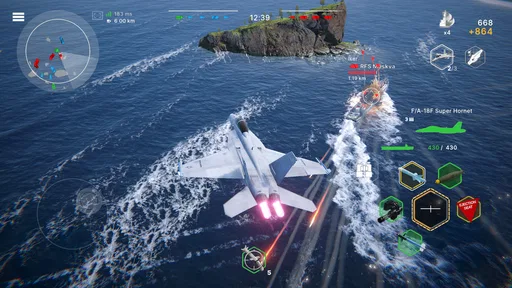
 Analysis by AppCompare
Before deciding whether to spend time on a naval action game, I’d first ask what kind of session I actually want: a quick burst of competition, or a slower experience built around planning and progression. Warships Mobile 2: Naval War is aimed at players who want both action and tactical choices, but that combination also means its appeal depends on how comfortable you are learning a game while battles are already demanding your attention.
Where the first session can feel demanding
My main advice to a new player is not to treat an early defeat as proof that the game is too difficult. In a naval battle, positioning and timing can matter as much as reacting quickly. If you rush into an encounter before you have a feel for how your ship handles, it is easy to spend the match responding to pressure rather than making deliberate choices. I’d use the opening sessions to notice what happens when I change course, when I attack, and how exposed I feel when I move away from support.
That learning curve is part of the attraction, but it is also a real limitation. Someone looking for a relaxed game that asks very little attention may find that active battles are a poor fit, especially when they want to play while distracted. I would not recommend judging it from a few hurried minutes between other tasks. A short session can work, but it helps to give each match enough attention to understand why a decision went well or badly.
When I get stuck, I try to change just one thing in the next match rather than attempting a complete tactical overhaul. If I moved too aggressively, I can hold back and watch the situation develop. If I waited so long that I could not contribute, I can choose a more useful moment to advance. This simple after-match habit makes losses feel informative instead of merely frustrating, and it avoids blaming the controls before I have learned the rhythm of play.
Setup checks before blaming the game
The game is free to download, is rated for Everyone, and is listed for devices running Android 6.0 or later. Its current version is 0.9.1. I’d check that the device meets the operating-system requirement and that the game has finished installing before trying to diagnose a launch or loading problem. If something seems wrong, closing the game and reopening it is a sensible first step; so is checking that the device has a stable connection when using online play.
Those checks are basic, but they help separate a setup problem from a gameplay problem. If the game opens but a match does not proceed as expected, I’d note whether the issue happens once or repeatedly and whether it appears only during online activity. Avoid changing several device settings at the same time: doing so makes it harder to tell which change helped. If the problem persists, using the device’s normal app-update and support routes is more useful than repeatedly reinstalling without first checking what is happening.
For a better first run, I’d also choose a moment when I can concentrate and make sure the device is comfortable to hold. Naval action is less enjoyable if I’m trying to learn movement and make tactical decisions while juggling interruptions. I would not assume that a particular control layout or device setting is available; instead, I’d take a moment to understand the controls the game actually presents on my device and avoid changing things mid-match until I know what each option does.
Worth Reading Before You Choose

Flipboard Shows What News Apps Must Do Beyond the Feed

Switching to Android Auto Means Rethinking Your Driving Routine

Google Calendar Makes a Crowded Week Easier to Manage

Ludo King Makes the Most of the Minutes Between Plans

Baby Panda World Brings Quick Play to Modern Phones, but Its Game Library Feels Busy

ESPN’s Live Game View Makes Following Close Games Easier
Recovering a session without losing your bearings
If a session is interrupted, I’d return to the game with a quick mental reset rather than immediately trying to recreate the last fight. Take a moment to check what screen you are on, what your next action is, and whether you are entering a new match or continuing from a menu. That small pause can prevent a rushed tap from turning a minor interruption into a confusing one. It is especially helpful if you were switching between the game and another app.
I also find it useful to keep progression decisions separate from match decisions. When I am focused on a battle, I try not to make an upgrade choice in a hurry just because I have reached a menu. Taking a moment to compare the options in front of me helps me spend resources more intentionally. Since upgrading vessels is part of the experience, it is worth treating those choices as a longer-term plan rather than an automatic step after every session.
One practical routine is to decide on a single goal before playing: learn how a ship handles, practice better timing, or make progress on an upgrade. I would not try to optimize everything at once. A clear goal gives each match a purpose and makes it easier to tell whether I am improving. It also helps keep a losing streak from turning into impulsive decisions, such as spending money simply to make a frustrating moment disappear.
Setting Sail: First Impressions
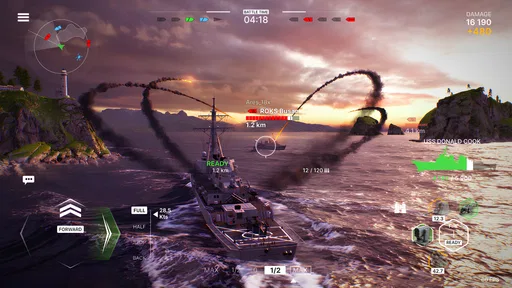
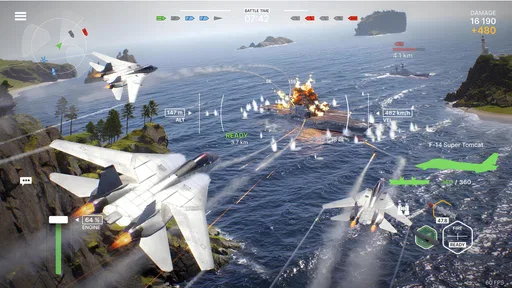
Jumping into Warships Mobile 2: Naval War is like stepping onto the deck of a mighty battleship. The graphics are top-notch, making the ocean waves look almost too real. The designers have done a stellar job with the visuals, from the detailed ship designs to the realistic battle animations. From the get-go, the game feels immersive, pulling you into its high-stakes conflicts.
The user interface is pretty intuitive. Even if you’re not a seasoned captain, you’ll find your way around without much fuss. The tutorial is concise but informative, giving you a quick rundown of controls and strategies. It's perfect for both newbies and veterans of the genre.
The Gameplay Experience
On the gameplay front, Warships Mobile 2: Naval War doesn’t disappoint. The battles are intense, requiring both quick reflexes and strategic thinking. You have to manage your fleet, plan your attacks, and anticipate enemy moves. It’s like a game of chess on water, with explosions, of course!
There’s a wide range of ships to choose from, each with unique strengths and weaknesses. Whether you prefer the agility of a destroyer or the brute force of a battleship, there’s something for everyone. Upgrading your vessels is a key part of the game, and it’s super satisfying to see your ship evolve into a formidable force.
Picking a play style that suits your time
The choices between different kinds of ships give the battles a useful point of contrast: I can favor movement and flexibility, or choose a heavier style that feels more focused on force. That choice is not just cosmetic. It affects what I should pay attention to during a match and how cautious I need to be. Rather than switching ships simply because one match went badly, I’d give a preferred style enough time to learn its strengths and limitations.
This is also where the game differs from many casual action alternatives. A straightforward arcade game may let me focus almost entirely on immediate reactions; a slower strategy game may ask me to plan without the same direct pressure. Here, the appeal is the overlap between the two. That makes it a better fit for someone who enjoys thinking while acting than for a player who wants either pure reflex action or leisurely, turn-based planning.
For an everyday example, I’d save it for a break when I can give a match my attention, rather than opening it during a commute stop or while waiting for a conversation to finish. If I have a little time after dinner, I can play with a specific goal and stop when I have had enough. If I only have a few distracted seconds, a simpler pick-up-and-play game is likely to be more satisfying. Online competition is most rewarding when I can stay focused on the decisions in front of me.
Multiplayer Mayhem
If you're anything like me, you love a good multiplayer showdown. The game shines in its multiplayer mode, where you can team up or face off against players worldwide. The matchmaking system is quite efficient, ensuring you’re paired with players of similar skill levels. This keeps the competition fair and the battles exciting.
Communication is essential in team battles, and thankfully, the game supports voice and text chat. It’s great for coordinating strategies and gloating when you sink an enemy flagship!
What multiplayer asks from the player
Competitive play can be the strongest reason to keep returning, but it can also make the experience less predictable than playing alone. I would approach a team match as a shared effort, not a guarantee that every player will follow the same plan. If coordination is not working, I’d focus on making my own position useful instead of spending the entire match trying to make strangers cooperate. That is a more practical way to stay engaged when a team’s approach differs from mine.
For someone deciding whether to try the multiplayer side, the useful question is not simply whether online battles sound exciting. It is whether they enjoy facing other people when the outcome is uncertain. Players who like adapting to opponents and learning from a loss are likely to get more from it. Anyone who finds competitive pressure stressful may prefer a game with a more predictable solo routine, if that is what they are looking for.
The game has an average rating of 4.8 from around 115 thousand ratings, and it has attracted over 5 million installs. Those figures suggest broad interest, but they cannot tell me whether its particular mix of naval action and competition will suit an individual player. I’d treat them as context, not as a substitute for deciding whether I enjoy the actual pace and learning process.
Progression, purchases, and a sensible spending approach
Progression is a reason to return, but it is also where I would keep a clear head. The game is free, with in-app purchases ranging from $0.99 to $199.99 per item. That is a broad range, so I would review any purchase carefully before confirming it and decide on a personal spending limit in advance. If I am still learning which ships and upgrades fit my style, waiting before buying anything is the more sensible choice.
I would not assume that paying is necessary to enjoy the game, nor would I assume that every purchase is equally useful. The better test is whether a specific item solves a problem I understand and genuinely want to address. If I am frustrated because I have not learned a ship’s strengths yet, a purchase may not fix that. Playing with a plan and learning the available progression at my own pace is a sounder first step.
Soundtrack and Audio Effects
The soundtrack in Warships Mobile 2: Naval War is nothing short of cinematic. The music ramps up the tension during battles and provides a calming backdrop when you’re strategizing. The sound effects are equally impressive, with the roar of cannons and the crash of waves adding to the immersive experience.
When the game may not be the cause
If an online session feels unreliable, I would first check whether the connection is stable and whether the issue is limited to this game or affects other online activity too. A brief interruption can make a competitive match feel unfair, but it does not automatically mean the game itself is at fault. Restarting the app and trying again when the connection is steadier are reasonable steps before making a bigger change to the device or installation.
Likewise, if battles feel overwhelming, I would distinguish between a technical issue and a strategy issue. A ship that feels hard to control may simply require more practice, while a game that repeatedly fails to open points toward a different kind of problem. Keeping those possibilities separate helps me avoid wasting time on unnecessary fixes. If a technical problem continues after basic checks, I’d use the appropriate support option rather than guessing at a cause.
Who I’d recommend it to
Armada Forge Games has made an action game for people who want naval combat to involve more than firing as soon as an opponent appears. I’d recommend it to players who enjoy learning different ship roles, weighing positioning against aggression, and testing their decisions against other players. The combination of tactical choices and active fights gives a match more texture than a basic arcade shooter, while remaining more immediate than a traditional strategy game.
I’d suggest skipping it if you want a calm, fully predictable experience, dislike multiplayer pressure, or are not interested in learning how different ships change your approach. It may also be a poor fit when you need a game that works well in very short, highly interrupted bursts. Those are not flaws for every player, but they are meaningful trade-offs for this particular style of play.
Final Thoughts: Is It Worth Your Time?
So, should you take the plunge and install Warships Mobile 2: Naval War? If you’re a fan of strategy games and naval warfare, I’d say it’s a must-try. It offers a perfect blend of action and strategy, with visuals and sound that elevate the gaming experience.
While it does have in-app purchases, they’re not intrusive, and you can enjoy the game without spending a dime. The community is active, and it’s easy to find others to play with or against. Overall, it’s a thrilling ride on the high seas that’s sure to keep you engaged for hours on end.
The game was released on July 26, 2024, and its current version is 0.9.1. I’d approach it as a free-to-start action game whose best moments come when I have time to pay attention, learn from each fight, and make considered progression choices. If that sounds appealing, it is worth trying; if you mainly want a low-pressure distraction, I would choose something gentler.
Ready to command your fleet and conquer the seas? Download Warships Mobile 2: Naval War and set sail on your next adventure!
Pros
- Stunning graphics with realistic ship details.
- Engaging multiplayer with global players.
- Wide variety of warships to choose from.
- Intuitive controls for smooth gameplay.
- Regular updates with new missions.
Cons
- Occasional lag in high-traffic servers.
- In-app purchases can be pricey.
- Requires constant internet connection.
- Battery drains quickly during gameplay.
- Limited customization for ships.
FAQs for Warships Mobile 2: Naval War
What are the system requirements for Warships Mobile 2: Naval War?
Warships Mobile 2: Naval War is designed to run smoothly on both Android and iOS devices. For Android, it requires version 5.0 or later, and for iOS, version 11.0 or later. Ensure your device has at least 2GB of RAM and sufficient storage space for optimal performance.
Is Warships Mobile 2: Naval War free to play?
Yes, Warships Mobile 2: Naval War is free to download and play. However, it offers in-app purchases that can enhance gameplay. These purchases include premium ships, skins, and other resources. While they can enhance your experience, they are entirely optional and not necessary to enjoy the game.
Does Warships Mobile 2: Naval War require an internet connection?
Yes, an active internet connection is required to play Warships Mobile 2: Naval War. The game features real-time multiplayer battles, which necessitate a stable connection to ensure a smooth gaming experience. It also regularly updates with new content, requiring internet access.
What types of ships are available in the game?
Warships Mobile 2: Naval War offers a diverse range of ships, including destroyers, cruisers, battleships, and aircraft carriers. Each type has unique attributes and abilities, catering to different playstyles. Players can unlock and upgrade their fleet using in-game currency or through purchases.
How can I contact customer support for Warships Mobile 2: Naval War?
If you encounter issues or have questions, you can contact customer support through the app. Navigate to the settings menu and select 'Support.' Alternatively, visit the official website for additional contact options and frequently updated troubleshooting guides.


